
Pay Calculator Australia
Work out your take-home pay after tax from any salary, wage or hourly rate. This salary calculator applies 2026–27 income tax, the Medicare levy, HECS/HELP and 12% super, and shows the tax your employer withholds on each payslip.
On a $75,000 salary in 2026–27 you take home $60,480 a year: $2,326.15 a fortnight or $1,163.08 a week after $14,520 of tax and Medicare levy.
Where your pay goes
Pay by period average over the year
| Period | Gross | Tax | Take-home | Super |
|---|
Your tax breakdown per year
On your payslip ATO tax tables from 1 July 2026
Your payslip uses the ATO withholding formulas, so it can differ slightly from your actual tax for the year.
Super paid by your employer on top
Compared with last year
—
Salary after tax: take-home pay on common salaries
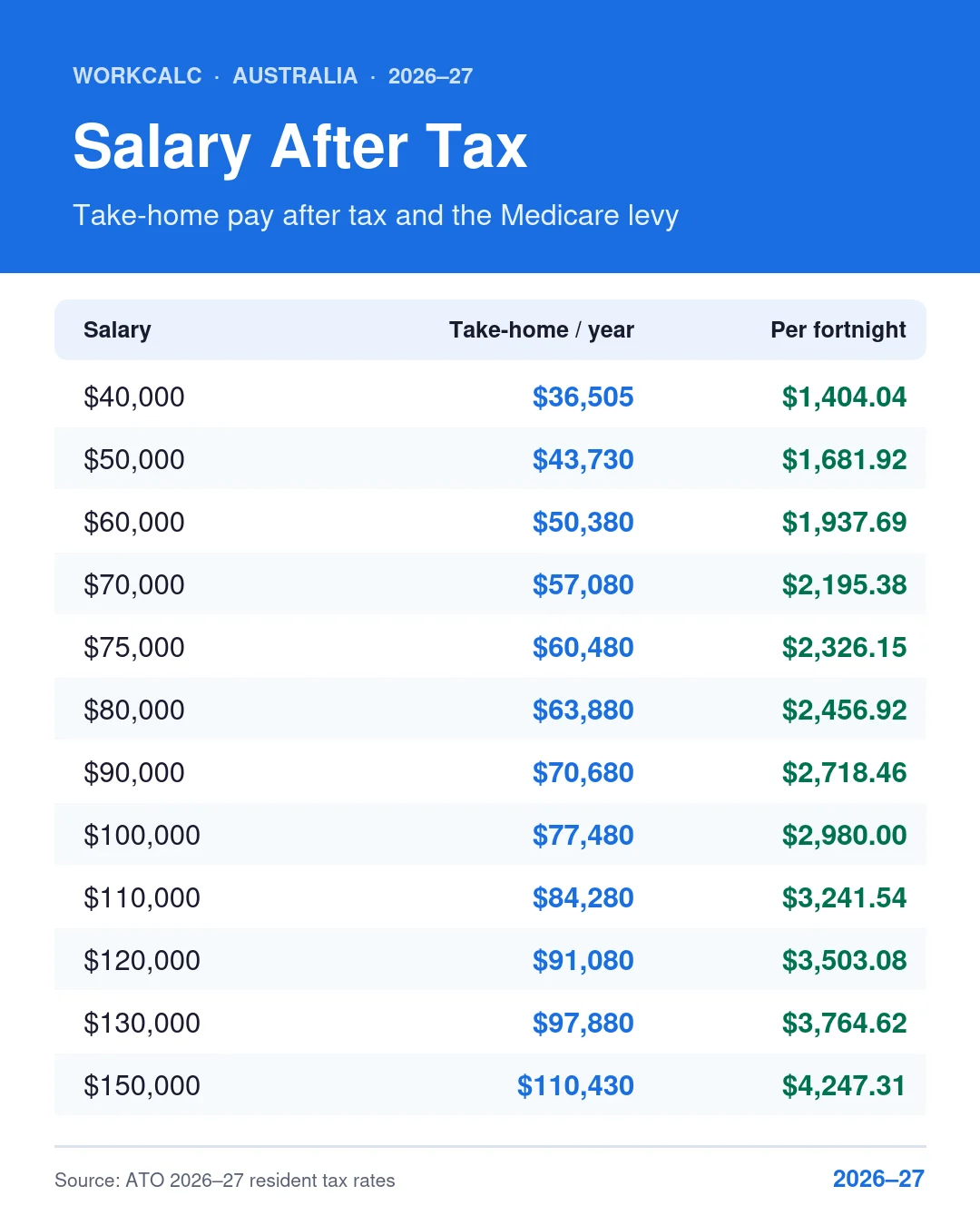
What you keep after income tax and the Medicare levy on each salary, for an Australian resident with no HECS/HELP debt. Tap a salary to load it into the calculator.
| Salary | Tax + Medicare | Take-home / year | Per fortnight | Per week | Avg tax rate |
|---|---|---|---|---|---|
| $3,495 | $36,505 | $1,404.04 | $702.02 | 8.7% | |
| $6,270 | $43,730 | $1,681.92 | $840.96 | 12.5% | |
| $9,620 | $50,380 | $1,937.69 | $968.85 | 16.0% | |
| $12,920 | $57,080 | $2,195.38 | $1,097.69 | 18.5% | |
| $14,520 | $60,480 | $2,326.15 | $1,163.08 | 19.4% | |
| $16,120 | $63,880 | $2,456.92 | $1,228.46 | 20.2% | |
| $19,320 | $70,680 | $2,718.46 | $1,359.23 | 21.5% | |
| $22,520 | $77,480 | $2,980.00 | $1,490.00 | 22.5% | |
| $25,720 | $84,280 | $3,241.54 | $1,620.77 | 23.4% | |
| $28,920 | $91,080 | $3,503.08 | $1,751.54 | 24.1% | |
| $32,120 | $97,880 | $3,764.62 | $1,882.31 | 24.7% | |
| $39,570 | $110,430 | $4,247.31 | $2,123.65 | 26.4% | |
| $51,270 | $128,730 | $4,951.15 | $2,475.58 | 28.5% | |
| $59,870 | $140,130 | $5,389.62 | $2,694.81 | 29.9% | |
| $83,370 | $166,630 | $6,408.85 | $3,204.42 | 33.3% |
How take-home pay is calculated in Australia
Your take-home pay (net pay) is your gross pay minus income tax, the Medicare levy and any HECS/HELP repayment. Super is not taken out of your pay. Your employer pays it on top, unless your salary package already includes it.
- Work out your annual pay. Hourly rate × hours per week × 52. For example, $35 an hour × 38 hours × 52 weeks = $69,160 a year.
- Subtract pre-tax amounts such as salary sacrifice to super. What's left is your taxable income (before any deductions you claim at tax time).
- Apply the income tax brackets below. Each rate applies only to the part of your income inside that bracket.
- Take off tax offsets, such as the low income tax offset of up to $700.
- Add the Medicare levy (2% of taxable income), plus the Medicare levy surcharge if you earn over the threshold without private hospital cover.
- Add your HECS/HELP repayment if you have a study loan and your repayment income is over $69,528. The HECS repayment calculator shows your yearly repayment and when your debt will be paid off.
2026–27 income tax brackets
These are the resident tax rates from 1 July 2026. The rate for income between $18,201 and $45,000 dropped from 16% to 15%, which saves up to $268 a year for anyone earning over $45,000. For a bracket-by-bracket breakdown, marginal rates and past years, see Australian tax brackets 2026–27.
| Taxable income | Tax on this income (2026–27) | 2025–26 rate |
|---|---|---|
| $0 – $18,200 | Nil | Nil |
| $18,201 – $45,000 | 15c for each $1 over $18,200 | 16% |
| $45,001 – $135,000 | $4,020 plus 30c for each $1 over $45,000 | 30% |
| $135,001 – $190,000 | $31,020 plus 37c for each $1 over $135,000 | 37% |
| $190,001 and over | $51,370 plus 45c for each $1 over $190,000 | 45% |
Foreign residents pay 30% from the first dollar (no tax-free threshold) and no Medicare levy. Working holiday makers pay 15% on income up to $45,000. Choose your tax status in the calculator to apply these rates.
Medicare levy and Medicare levy surcharge
Most residents pay a 2% Medicare levy. Singles pay no levy on taxable income up to $28,011, and a reduced levy up to $35,013. The Medicare levy surcharge is an extra 1% to 1.5% if you don't hold private hospital cover and your income for surcharge purposes is above the threshold:
| 2026–27 income (singles) | Families | Surcharge |
|---|---|---|
| $105,000 or less | $210,000 or less | 0% |
| $105,001 – $123,000 | $210,001 – $246,000 | 1% |
| $123,001 – $164,000 | $246,001 – $328,000 | 1.25% |
| $164,001 or more | $328,001 or more | 1.5% |
Income for surcharge purposes includes salary sacrifice to super, so sacrificing doesn't get you under the threshold. This calculator uses the singles thresholds.
HECS/HELP repayments in 2026–27
Since 2025–26, study loan repayments use a marginal system: you repay a percentage of the income above the threshold, not of your whole income. Your repayment income includes salary sacrificed super.
| Repayment income | Compulsory repayment (2026–27) |
|---|---|
| $0 – $69,528 | Nil |
| $69,529 – $129,717 | 15c for each $1 over $69,528 |
| $129,718 – $186,050 | $9,028 plus 17c for each $1 over $129,717 |
| $186,051 and over | 10% of total repayment income |
For 2025–26 the thresholds were $67,000, $125,000 and $179,285. On a $100,000 salary the 2026–27 repayment is 15% × $30,472 = $4,570.80.
Super: 12% on top of your pay
The super guarantee is 12% of your ordinary time earnings for 2026–27. It's paid into your super fund, not your bank account, so it doesn't reduce your take-home pay. From 1 July 2026, under Payday Super, employers must pay super every payday instead of quarterly. If your salary is quoted “including super”, divide it by 1.12 to find your base pay: $112,000 including super is $100,000 salary plus $12,000 super.
Salary sacrifice and employer super both count towards the $32,500 concessional contributions cap for 2026–27. The calculator warns you if you go over. To compare sacrifice options in more detail, use the salary sacrifice calculator.
Why your payslip tax is different
Your employer withholds tax using the ATO's pay-period formulas (Schedule 1), which assume you earn the same amount every payday for the whole year. Your actual tax is worked out on your total income when you lodge your return. The difference becomes a refund or a bill. The most common reasons:
- Deductions you claim at tax time reduce your tax, but not the tax withheld.
- Two jobs: you can only claim the tax-free threshold from one employer. The second job withholds more, which usually comes back as a refund.
- Medicare levy surcharge isn't withheld unless you ask, so it can create a tax bill.
- 27 pays: some years have 27 fortnightly paydays. The ATO lets you ask your employer to withhold a little extra, from $12 to $48 a fortnight depending on your pay.
- Bonuses and overtime are withheld at your marginal rate, which can look high on the payslip.
The payslip panel in the calculator uses the exact 2026–27 withholding formulas and coefficients, including the HECS/HELP component. It also estimates whether you'll get a refund or owe tax. To check tax on a single pay, use the PAYG withholding calculator.
What changed on 1 July 2026
- The 16% tax rate dropped to 15%, worth up to $268 a year.
- HECS/HELP repayments now start at $69,528 (up from $67,000).
- Medicare levy surcharge thresholds rose to $105,000 for singles and $210,000 for families.
- The concessional super cap rose to $32,500, and Payday Super started.
- The national minimum wage rose to $26.44 an hour. Check your rate with the minimum wage calculator.
For a slower walkthrough with more examples, read how to calculate your take-home pay. If you're paid by the hour and work extra shifts, the overtime calculator and public holiday pay rates cover penalty rates in detail.
Sources
Other pay and tax calculators
Check the tax withheld from each pay, your super, salary sacrifice, overtime and the minimum wage. Looking for leave, redundancy or public holidays? See all workplace calculators.
PAYG Withholding
Weekly, fortnightly, monthly income tax withholding.
Open →Superannuation Calculator
12% SG rate: what your employer must pay.
Open →Salary Sacrifice Calculator
See if sacrificing to super cuts your tax bill.
Open →Overtime Calculator
Time-and-a-half and double-time pay rates.
Open →Minimum Wage Calculator
$26.44/hr from 1 July 2026, in every pay period.
Open →YTD Calculator
Project your full-year income and tax refund.
Open →Understand your pay and salary
Plain-English guides to what's taken out of your pay, what your employer must add, and how extra hours are paid.
How to Calculate Take-Home Pay in Australia (2026–27 Guide)
The full formula behind your payslip (tax brackets, Medicare levy, HELP and super) with step-by-step worked examples.
Read guide → SuperannuationHow Much Super Should My Employer Pay? SG Rate and OTE Rules (2026)
The 12% super guarantee, what counts as ordinary time earnings, who's eligible and what to do if you're underpaid.
Read guide → Pay & OvertimeHow Is Overtime Calculated in Australia?
Time and a half, double time and penalty rates explained, with worked examples of how overtime changes your pay.
Read guide →Pay and salary calculator FAQs
Quick answers using 2026–27 rates for Australian residents.
How do I use this pay and salary calculator?
Enter your salary, wage or hourly rate, choose how often it's paid (year, month, fortnight, week, day or hour) and pick the tax year. The calculator shows your take-home pay for every pay period after income tax, the Medicare levy and any HECS/HELP repayment, plus the tax withheld on each payslip and the 12% super your employer adds.
What is $60,000 after tax in Australia?
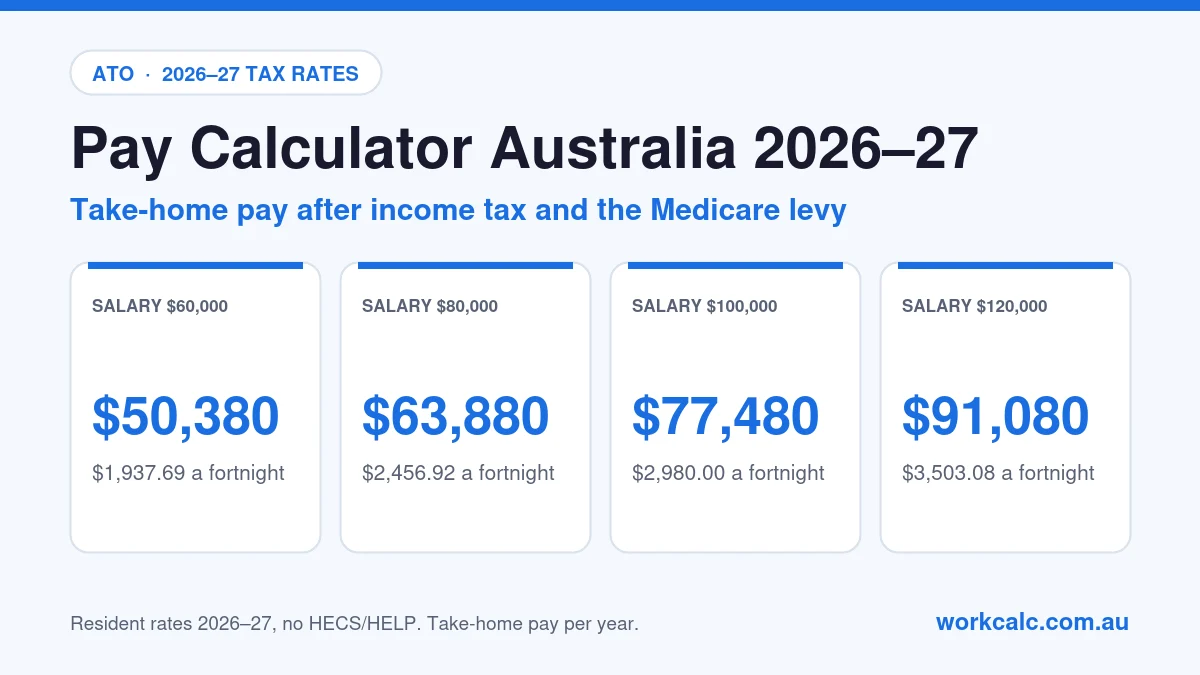
$50,380 a year in 2026–27, which is $1,937.69 a fortnight or $968.85 a week. That's after $9,620 of income tax and Medicare levy, with the low income tax offset applied.
What is $75,000 after tax in Australia?
$60,480 a year in 2026–27: $2,326.15 a fortnight or $1,163.08 a week. You pay $13,020 income tax and a $1,500 Medicare levy, $14,520 in total. Your employer also pays $9,000 super on top.
What is $80,000 after tax in Australia?
$63,880 a year in 2026–27, or $2,456.92 a fortnight and $1,228.46 a week, after $14,520 income tax and a $1,600 Medicare levy.
What is $90,000 after tax in Australia?
$70,680 a year in 2026–27: $2,718.46 a fortnight or $1,359.23 a week, after $19,320 of income tax and Medicare levy.
What is $100,000 after tax in Australia?
$77,480 a year in 2026–27: $2,980.00 a fortnight, $1,490.00 a week or $6,456.67 a month. That's after $20,520 income tax and a $2,000 Medicare levy.
What is $120,000 after tax in Australia?
$91,080 a year in 2026–27 ($3,503.08 a fortnight or $1,751.54 a week) with private hospital cover. Without cover, the 1% Medicare levy surcharge adds $1,200, so turn off "I have private hospital cover" to include it.
How much is $30 an hour a year after tax?
At 38 hours a week, $30 an hour is $59,280 a year before tax and $49,901 after tax in 2026–27. That's $1,919.28 a fortnight or $959.64 a week. Choose "Hour" in the calculator and enter your own hours for an exact figure.
How do I work out my fortnightly pay after tax?
Enter your fortnightly pay and choose "Fortnight", or divide your annual take-home pay by 26. For example, $3,000 a fortnight ($78,000 a year) is about $2,404.62 a fortnight after tax. The ATO tax tables withhold $598 each fortnight, leaving $2,402 on your payslip.
How is take-home pay calculated in Australia?
Take-home pay = gross pay − income tax (after offsets such as the low income tax offset) − Medicare levy − any Medicare levy surcharge − any HECS/HELP repayment. In 2026–27 income tax is 0% to $18,200, 15% to $45,000, 30% to $135,000, 37% to $190,000 and 45% above that. Super is paid on top.
Is super included in my salary?
Usually not. The 12% super guarantee is paid by your employer on top of your salary. If a job is advertised as a package including super, divide by 1.12: $100,000 including super is $89,286 salary plus $10,714 super, which is $70,194 after tax. Turn on "My pay includes super" to calculate it.
Why is the tax on my payslip different from this calculator?
Employers withhold tax using the ATO's pay-period formulas, which assume you earn the same every payday all year. Your real tax is worked out on your total income when you lodge your return, after deductions, offsets and any second job. The payslip panel shows both figures and estimates your refund or bill.
What changed for pay on 1 July 2026?
The 16% tax rate fell to 15%, worth up to $268 a year. The HECS/HELP repayment threshold rose to $69,528, Medicare levy surcharge thresholds rose to $105,000 for singles, the concessional super cap rose to $32,500, Payday Super started and the national minimum wage rose to $26.44 an hour.
Estimates only. Results assume one job for the full year and no other income, and use singles thresholds for the Medicare levy and surcharge. They don't include family tax offsets, fringe benefits or investment income. This is general information, not tax advice. For your exact position use the ATO's calculators or ask a registered tax agent.